
 Casino
 Live Casino
 Login
Login Slots
Slots Mobile App
 Promotions
 Support
 Reviews
 Search

bCasino Login and Sign Up Process in NZ
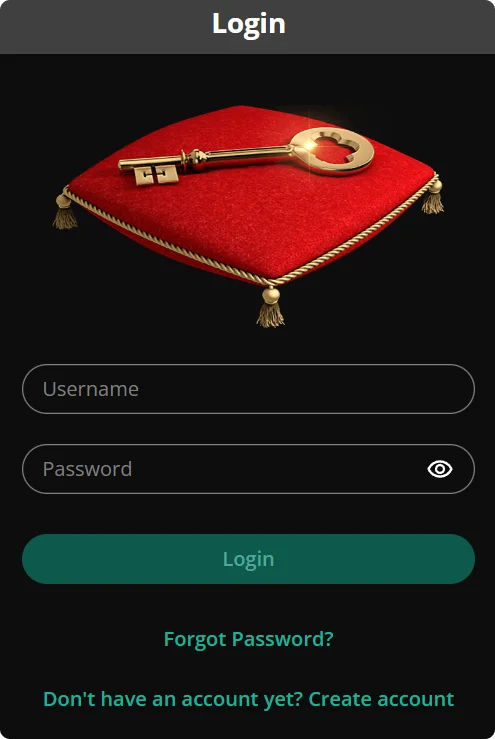
b Casino registration unlocks full casino services, including bonus eligibility, withdrawals and deposits. You will be classed as a registered user once you verify your email or mobile number, select NZD, accept the terms and pass a quick age/ID check.
That status gives you secure access, clear deposit and play history and account support. It also enables safer payments and the option to add 2-step security for peace of mind. Whenever you return, you can easily use your bCasino login to pick up where you left off.
bCasino Sign Up Steps for New Players
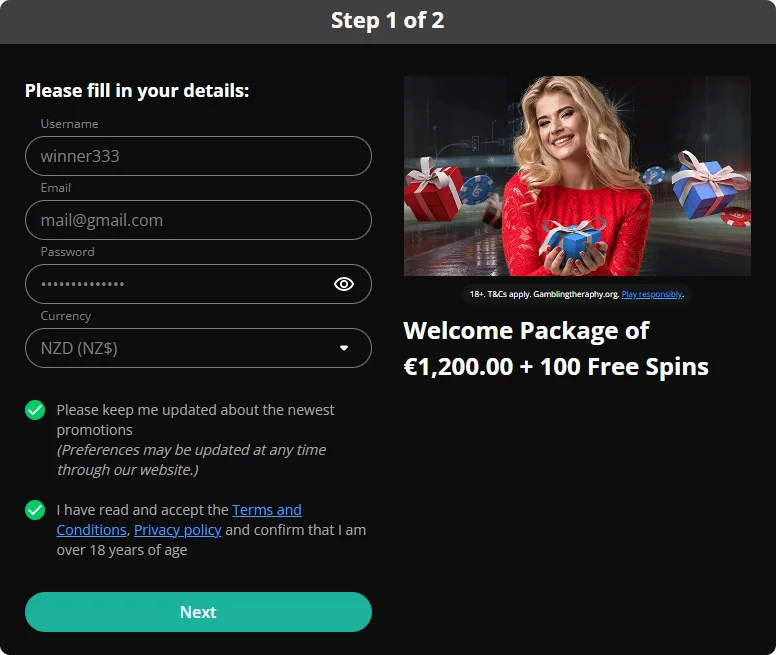
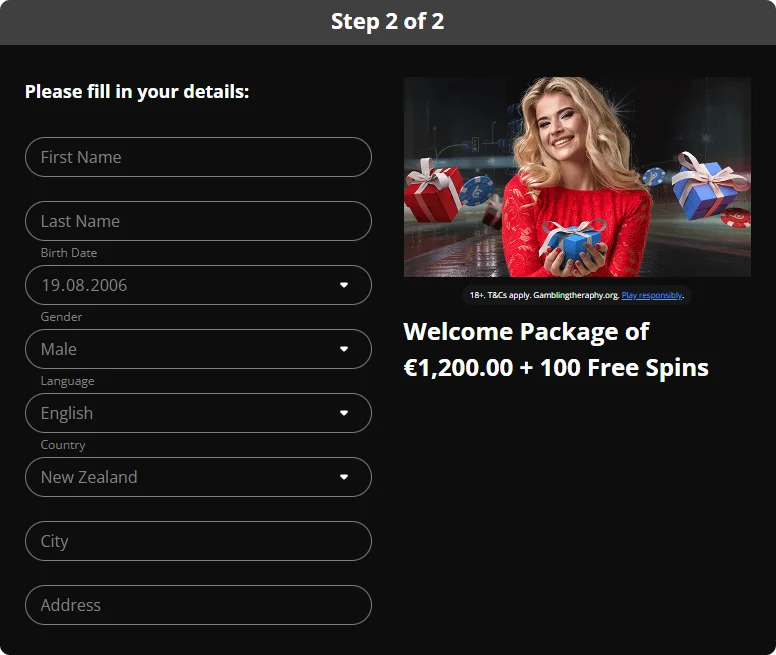
As a new user, you can complete the bCasino sign up process in a matter of minutes. All you need is some basic personal information, and you will be ready to go. Follow the easy steps below to set up your account:
-
Search for the bright “Register” button at the top right corner and give it a click to initiate the b Casino sign up process. It is located in the same area on both mobile and PC.
-
Fill in the form with your email, pick a username and create a password. Ensure that you choose NZD (NZ$) as your currency so you can transact in your local currency.
-
Next, we’ll ask for a few personal details like your name and date of birth (to confirm you’re 18+). No worries, we will keep your info safe and secure.
-
Tick the box to accept our terms and conditions, then hit “Register”. We’ll send you a confirmation email in due course. Click the link inside to verify your account.
-
That’s it! Your new bCasino account is ready. Enter your b Casino login details and have a look around. If you need a hand, our friendly support team is here to help.
Verifying Your Account
After completing your bCasino sign up, we will require you to verify your account with a quick ID check. We will accept a driver’s licence or passport for your verification. We do this to ensure you meet the New Zealand legal gambling age and protect your profile.
The verification process is usually quick, provided there are no issues with the document. You can upload your documents through our site or send them via email. Our team will check and approve them. Once our verification team approves your documents, you will be able to make your first withdrawal. Rest assured, your personal info stays private and protected with us.
Quick Verification Table
| What You’ll do | Why It’s Required | Accepted Documents |
|---|---|---|
| Confirm email after b Casino registration | Activates your profile so you can log in and use the Cashier | Email verification link |
| Complete ID verification (KYC) | Confirms identity and legal age for New Zealand compliance and safeguards your account | Government photo ID such as passport or driver’s licence; often a recent proof of address (e.g., utility bill/bank statement) |
| Processing & approval | We review documents and match details to your account | Clear images; unexpired ID; address docs typically within last 3 months |
| After verification | “Keep details current in My Account” | Update address/phone if they change |
b Casino Login into Your Profile
The bCasino login is smooth on all devices. Here’s how to access your profile in simple steps:
- On the desktop, you’ll find the “Login” button at the top-right of the page. On mobile, tap the menu icon and then select “Login”.
- Type in the username or email and password you chose during your bCasino registration (make sure they match exactly).
- Tap the “Login” button. If you’ve enabled our two-step verification, pop in the code we send you. That would serve as an extra security check to confirm it’s you.
Login via Mobile App
bCasino currently does not offer a dedicated mobile app for Android or iOS. Instead, players access the platform on mobile through its responsive website (essentially a Progressive Web App) using a mobile browser. To log in, they open the official site on their mobile device, tap the menu or login option and enter their b Casino login details.
The mobile site is fully optimised. It provides the same account features as the desktop platform. This includes playing games, making deposits and claiming bonuses, like 60% Weekend Bonus or 100 Daily Spins.
Privacy Information
As a licensed operator (UKGC/MGA), bCasino follows strict privacy and security rules, including third-party security audits mapped to ISO/IEC 27001. As a result, controls are checked regularly, not just once.
To stop hacks before they start, we use layered protection at the edge like web-application firewalls, bot screening, rate-limiting and always-on DDoS mitigation. This is the same stack that iGaming platforms deploy to keep sites stable during traffic spikes and hostile floods.
For account security, we use temporary lockouts after repeated wrong bCasino login details, smart session timeouts and occasional human-checks (e.g., CAPTCHA) if something looks off. These are controls recommended by OWASP to block brute-force and session abuse.
Also, payments run through PCI DSS–aligned gateways with active fraud monitoring and ongoing compliance under the latest standard. With this in place, we protect card data and reduce attack surface.
Before your first cash-out, standard KYC confirms identity and address (passport/driver licence + recent bill). That stops impersonation and protects your account if credentials are ever compromised.
Possible bCasino Login NZ Issues
Are you encountering login issues? Message our team and we’ll sort it with you, fast. Below, we explain several ways you can b Casino login issues and get straight back to the action.
- Too many wrong attempts – If you enter the wrong password several times, access may be temporarily blocked to stop brute-force attacks. Wait a bit and try again, or contact support to lift the block. This control is recommended by OWASP.
- Quick human check – You might occasionally see a short CAPTCHA if something looks unusual. It’s a brief “are you human?” step used widely to keep bots out and keep your account safe.
How to Delete Account from Platform
Did you decide you’d like to close your bCasino account? We understand if you’re feeling overwhelmed or just need a break. Remember you can use our time-out and deposit/loss limits, or reach out for help.
- Input your bCasino login and go to the Support/Help section, or find the “Contact Us” page on our site.
- Get in touch with our customer support team. You can chat with us live or email us. Please let us know you want to close your profile.
- We’ll confirm your details and process the closure. We’ll guide you through it and can discuss any break options or next steps.
- If you have any doubts or need help, just drop us a message. We’re always here to assist you.
Password Recovery Instructions
If you forgot your password, our b Casino login area is always in the top right corner of any page. Just tap “Login”, click “Forgot Password?” and enter the email you signed up with. We’ll email you a secure reset link, usually within a few minutes.
Then just follow the steps in that email to set a new password and you’re sorted. It’s quick and safe. Our team uses SSL encryption to keep your info protected, so you’ll be back playing before you know it. We assure you that it won’t take long.